The Complete Guide to Building a Multi-Tenant SaaS Application
Building a multi-tenant SaaS application is one of the most complex yet rewarding challenges in modern software development. With the global SaaS market projected to reach $716.52 billion by 2028, understanding how to architect scalable, secure, and cost-effective multi-tenant systems has become essential for any serious SaaS entrepreneur or development team.
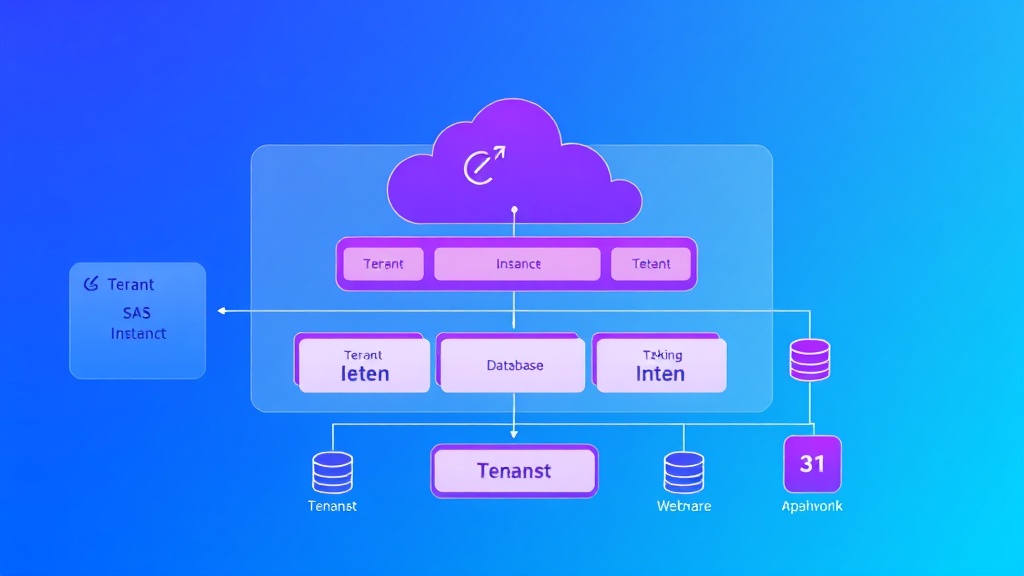
Multi-tenancy allows a single application instance to serve multiple customers (tenants) while maintaining data isolation, customization capabilities, and optimal resource utilization. This architectural pattern is what enables platforms like Airtable and Amplitude to serve millions of users efficiently while keeping operational costs manageable.
This comprehensive guide will walk you through every aspect of building a production-ready multi-tenant SaaS application, from initial architecture decisions to deployment strategies and ongoing maintenance considerations.
Prerequisites and Foundation Knowledge
Before diving into multi-tenant architecture, ensure you have solid experience with the following technologies and concepts:
Technical Prerequisites
- Backend Development: Proficiency in at least one modern backend framework (Node.js/Express, Django, Ruby on Rails, or .NET Core)
- Database Management: Advanced SQL knowledge and experience with PostgreSQL, MySQL, or SQL Server
- Cloud Infrastructure: Hands-on experience with AWS, Azure, or Google Cloud Platform
- Containerization: Docker and Kubernetes fundamentals
- API Design: RESTful API development and authentication mechanisms
- Security Concepts: Understanding of OWASP guidelines, data encryption, and access control
Business Prerequisites
- Market Research: Clear understanding of your target market and competitive landscape
- Pricing Strategy: Defined pricing tiers and feature differentiation
- Compliance Requirements: Knowledge of relevant regulations (GDPR, HIPAA, SOC 2)
- Scalability Planning: Projected user growth and resource requirements
Expert Tip: Start with a single-tenant MVP to validate your market fit before investing in multi-tenant complexity. The additional architectural overhead is only justified once you have proven demand and multiple paying customers.
Multi-Tenant Architecture Strategies
There are three primary approaches to implementing multi-tenancy, each with distinct trade-offs in terms of isolation, scalability, and operational complexity.
1. Shared Database, Shared Schema
This approach uses a single database with tenant identification columns in each table. It’s the most cost-effective but requires careful implementation to prevent data leakage.
Advantages:
- Lowest infrastructure costs
- Simplified database maintenance
- Easy to implement cross-tenant analytics
- Efficient resource utilization
Disadvantages:
- Higher security risk
- Limited customization options
- Potential performance bottlenecks
- Complex backup and recovery procedures
2. Shared Database, Separate Schema
Each tenant gets their own database schema within a shared database instance. This provides better isolation while maintaining operational efficiency.
Advantages:
- Better data isolation
- Easier tenant-specific customizations
- Simplified backup per tenant
- Moderate infrastructure costs
Disadvantages:
- More complex application logic
- Schema migration challenges
- Limited database-level optimizations
3. Separate Database Per Tenant
Each tenant receives a completely isolated database instance. This provides maximum security and customization at the highest operational cost.
Advantages:
- Maximum data isolation
- Tenant-specific performance tuning
- Independent scaling capabilities
- Easier compliance management
Disadvantages:
- Highest infrastructure costs
- Complex operational overhead
- Difficult cross-tenant analytics
- Increased maintenance burden
| Aspect | Shared Schema | Separate Schema | Separate Database |
|---|---|---|---|
| Security | Low | Medium | High |
| Cost | Low | Medium | High |
| Scalability | Medium | Medium | High |
| Customization | Low | Medium | High |
| Operational Complexity | Low | Medium | High |
Detailed Implementation Steps
Step 1: Design Your Tenant Model
Start by defining how tenants will be identified and managed within your system. Here’s a basic tenant model structure:
// Tenant Entity (Node.js/TypeScript example)
interface Tenant {
  id: string;
  name: string;
  subdomain: string;
  plan: 'starter' | 'professional' | 'enterprise';
  settings: TenantSettings;
  createdAt: Date;
  isActive: boolean;
  databaseConfig?: DatabaseConfig;
}

interface TenantSettings {
  maxUsers: number;
  features: string[];
  customBranding: boolean;
  apiRateLimit: number;
}
Step 2: Implement Tenant Resolution
Create middleware to identify tenants from incoming requests. Common approaches include:
- Subdomain-based: tenant.yourapp.com
- Header-based: X-Tenant-ID header
- Path-based: /api/v1/tenants/{tenant-id}/resources
// Express.js middleware example
const tenantResolver = async (req, res, next) => {
  try {
    let tenantId;

    // Subdomain resolution
    const subdomain = req.hostname.split('.')[0];
    if (subdomain && subdomain !== 'www') {
      const tenant = await Tenant.findBySubdomain(subdomain);
      tenantId = tenant?.id;
    }

    // Header fallback
    if (!tenantId) {
      tenantId = req.headers['x-tenant-id'];
    }

    if (!tenantId) {
      return res.status(400).json({ error: 'Tenant not specified' });
    }

    req.tenant = await Tenant.findById(tenantId);
    if (!req.tenant || !req.tenant.isActive) {
      return res.status(404).json({ error: 'Tenant not found' });
    }

    next();
  } catch (error) {
    res.status(500).json({ error: 'Tenant resolution failed' });
  }
};
Step 3: Database Connection Management
For shared schema approach, implement tenant-aware queries:
// Sequelize model with tenant scoping
const User = sequelize.define('User', {
  id: DataTypes.UUID,
  tenantId: DataTypes.UUID,
  email: DataTypes.STRING,
  name: DataTypes.STRING
}, {
  defaultScope: {
    where: {
      tenantId: null // Will be overridden by tenant context
    }
  },
  scopes: {
    tenant: (tenantId) => ({
      where: { tenantId }
    })
  }
});

// Usage in controller
const getUsers = async (req, res) => {
  const users = await User.scope({ method: ['tenant', req.tenant.id] }).findAll();
  res.json(users);
};
Step 4: Implement Feature Gating
Create a flexible system to control feature access based on tenant plans:
class FeatureGate {
  static canAccess(tenant, feature) {
    const planFeatures = {
      starter: ['basic_analytics', 'email_support'],
      professional: ['basic_analytics', 'advanced_analytics', 'priority_support', 'api_access'],
      enterprise: ['basic_analytics', 'advanced_analytics', 'priority_support', 'api_access', 'custom_integrations', 'sso']
    };

    return planFeatures[tenant.plan]?.includes(feature) || false;
  }

  static middleware(feature) {
    return (req, res, next) => {
      if (!this.canAccess(req.tenant, feature)) {
        return res.status(403).json({
          error: 'Feature not available in your plan',
          feature,
          currentPlan: req.tenant.plan
        });
      }
      next();
    };
  }
}
Step 5: Billing and Subscription Management
Integrate with payment processors like Stripe for subscription management:
class BillingService {
  static async createSubscription(tenant, planId) {
    const customer = await stripe.customers.create({
      email: tenant.email,
      metadata: { tenantId: tenant.id }
    });

    const subscription = await stripe.subscriptions.create({
      customer: customer.id,
      items: [{ price: planId }],
      metadata: { tenantId: tenant.id }
    });

    await tenant.update({
      stripeCustomerId: customer.id,
      stripeSubscriptionId: subscription.id,
      plan: this.getPlanFromPriceId(planId)
    });

    return subscription;
  }
}
Security and Data Isolation
Row-Level Security Implementation
For PostgreSQL, implement row-level security policies:
-- Enable RLS on tables
ALTER TABLE users ENABLE ROW LEVEL SECURITY;
ALTER TABLE projects ENABLE ROW LEVEL SECURITY;

-- Create policy for tenant isolation
CREATE POLICY tenant_isolation ON users
    FOR ALL TO application_role
    USING (tenant_id = current_setting('app.current_tenant')::uuid);

-- Set tenant context in application
SET app.current_tenant = '550e8400-e29b-41d4-a716-446655440000';
API Security Best Practices
- JWT Token Scoping: Include tenant ID in JWT claims
- Rate Limiting: Implement per-tenant rate limiting
- Input Validation: Validate all tenant-specific inputs
- Audit Logging: Log all tenant actions for compliance
Security Note: Never trust client-side tenant identification. Always validate tenant access server-side and implement defense-in-depth strategies to prevent data leakage between tenants.
Scaling and Performance Optimization
Database Optimization Strategies
- Indexing: Create composite indexes on (tenant_id, frequently_queried_columns)
- Partitioning: Use table partitioning by tenant_id for large datasets
- Connection Pooling: Implement tenant-aware connection pooling
- Read Replicas: Use read replicas for analytics and reporting
Caching Strategies
Implement tenant-aware caching with Redis:
class TenantCache {
  static getKey(tenantId, resource, id) {
    return `tenant:${tenantId}:${resource}:${id}`;
  }

  static async get(tenantId, resource, id) {
    const key = this.getKey(tenantId, resource, id);
    const cached = await redis.get(key);
    return cached ? JSON.parse(cached) : null;
  }

  static async set(tenantId, resource, id, data, ttl = 3600) {
    const key = this.getKey(tenantId, resource, id);
    await redis.setex(key, ttl, JSON.stringify(data));
  }
}
Troubleshooting Common Issues
Data Leakage Prevention
Problem: Accidentally exposing data between tenants
Solution: Implement automated testing for tenant isolation:
// Jest test example
describe('Tenant Isolation', () => {
  it('should not return data from other tenants', async () => {
    const tenant1 = await createTestTenant();
    const tenant2 = await createTestTenant();

    const user1 = await createUser({ tenantId: tenant1.id });
    const user2 = await createUser({ tenantId: tenant2.id });

    const response = await request(app)
      .get('/api/users')
      .set('X-Tenant-ID', tenant1.id)
      .expect(200);

    expect(response.body).toHaveLength(1);
    expect(response.body[0].id).toBe(user1.id);
  });
});
Performance Bottlenecks
Problem: Slow queries due to missing tenant-specific indexes
Solution: Monitor query performance and add appropriate indexes:
-- Add composite indexes for common query patterns
CREATE INDEX CONCURRENTLY idx_users_tenant_email
ON users (tenant_id, email);

CREATE INDEX CONCURRENTLY idx_projects_tenant_created
ON projects (tenant_id, created_at DESC);
Database Connection Exhaustion
Problem: Running out of database connections with multiple tenants
Solution: Implement proper connection pooling and monitoring:
// Connection pool configuration
const pool = new Pool({
  host: process.env.DB_HOST,
  database: process.env.DB_NAME,
  user: process.env.DB_USER,
  password: process.env.DB_PASSWORD,
  max: 20, // Maximum connections
  min: 5,  // Minimum connections
  acquireTimeoutMillis: 30000,
  createTimeoutMillis: 30000,
  idleTimeoutMillis: 30000
});
Deployment and DevOps Considerations
Container Orchestration
Deploy using Kubernetes with proper resource allocation:
apiVersion: apps/v1
kind: Deployment
metadata:
  name: saas-app
spec:
  replicas: 3
  selector:
    matchLabels:
      app: saas-app
  template:
    metadata:
      labels:
        app: saas-app
    spec:
      containers:
      - name: app
        image: your-registry/saas-app:latest
        resources:
          requests:
            memory: "256Mi"
            cpu: "250m"
          limits:
            memory: "512Mi"
            cpu: "500m"
        env:
        - name: NODE_ENV
          value: "production"
Monitoring and Observability
Implement tenant-aware monitoring with tools like Prometheus and Grafana. Track key metrics including:
- Per-tenant response times
- Database query performance by tenant
- Feature usage analytics
- Error rates and exceptions
- Resource consumption patterns
Many successful SaaS platforms like Bubble have built sophisticated monitoring systems that provide real-time insights into tenant behavior and system performance, enabling proactive scaling and issue resolution.
Integration with Third-Party Services
Modern SaaS applications require seamless integration with various third-party services. Consider implementing tenant-specific configurations for:
- Email Marketing: Integration with platforms like ActiveCampaign for tenant-specific campaigns
- Analytics: Custom tracking implementations that respect tenant boundaries
- Payment Processing: Tenant-specific Stripe accounts and webhook handling
- File Storage: Isolated S3 buckets or folder structures per tenant
Frequently Asked Questions
How do I handle database migrations in a multi-tenant environment?
Database migrations in multi-tenant systems require careful planning. For shared schema approaches, run migrations against the main database and ensure all tenant data remains compatible. For separate schema/database approaches, implement automated migration scripts that run against all tenant databases sequentially. Always test migrations in staging environments that mirror your production tenant setup, and consider implementing rollback strategies for critical migrations.
What’s the best approach for handling tenant-specific customizations?
Implement a flexible configuration system that allows tenant-specific settings without code changes. Use JSON configuration fields in your tenant model to store customizations like UI themes, feature flags, and business rules. For more complex customizations, consider a plugin architecture where tenants can enable/disable specific modules. Avoid tenant-specific code branches, as they become unmaintainable at scale.
How do I ensure data compliance across different tenants with varying requirements?
Build compliance into your architecture from day one. Implement configurable data retention policies, encryption settings, and audit logging per tenant. Create a compliance dashboard that shows each tenant’s current compliance status and any required actions. For regulations like GDPR, implement automated data deletion workflows and consent management systems that operate at the tenant level.
What’s the most cost-effective way to scale a multi-tenant SaaS application?
Start with a shared schema approach for cost efficiency, then migrate high-value enterprise customers to dedicated resources as needed. Implement auto-scaling based on aggregate tenant usage rather than individual tenant spikes. Use cloud-native services that scale automatically, and implement efficient caching strategies to reduce database load. Monitor per-tenant costs and implement usage-based pricing to ensure profitability as you scale.
Next Steps and Resources
Building a successful multi-tenant SaaS application is an iterative process that requires continuous optimization and refinement. Start with a minimal viable architecture, validate your approach with real customers, and gradually add complexity as your needs evolve.
Key next steps include implementing comprehensive monitoring, setting up automated testing for tenant isolation, and establishing processes for onboarding new tenants efficiently. Consider investing in infrastructure automation tools and establishing clear operational procedures for managing multiple tenant environments.
For organizations looking to accelerate their SaaS development journey, partnering with experienced automation specialists can significantly reduce time-to-market and avoid common pitfalls. futia.io’s automation services can help you implement robust multi-tenant architectures, set up automated deployment pipelines, and integrate the essential tools needed to scale your SaaS business effectively.
🛠️ Tools Mentioned in This Article