How to Automate Recruitment Screening with AI: Complete Guide
The average recruiter spends 23 hours screening resumes for a single hire, with 75% of that time dedicated to manual tasks that could be automated. For companies processing hundreds of applications weekly, this translates to thousands of hours lost annually—time that could be redirected toward strategic talent acquisition and candidate relationship building.
AI-powered recruitment automation transforms this bottleneck into a streamlined pipeline, reducing screening time by up to 70% while improving candidate quality through consistent, bias-free evaluation. This comprehensive guide walks you through building an end-to-end automated recruitment system that handles everything from resume parsing to interview scheduling.
The Problem: Manual Recruitment Bottlenecks
Traditional recruitment processes suffer from multiple inefficiencies that compound as hiring volume increases:
- Resume overload: Popular job postings receive 250+ applications, with recruiters spending 6-7 seconds per initial resume review
- Inconsistent screening: Manual evaluation introduces subjective bias and varying standards across different reviewers
- Scheduling chaos: Coordinating interviews between candidates, hiring managers, and team members creates administrative overhead
- Communication gaps: Candidates often wait days for updates, leading to 57% dropping out due to poor communication
- Data fragmentation: Information scattered across emails, spreadsheets, and ATS systems makes tracking difficult
These challenges become exponentially more complex for growing companies or seasonal hiring surges. A systematic automation approach addresses each pain point while maintaining candidate experience quality.
Essential Tools for Recruitment Automation
Building an effective automated recruitment system requires integrating specialized tools across different workflow stages:
Core Automation Platform
Make (formerly Integromat) serves as the central orchestration platform, connecting various recruitment tools through visual workflows. Its 1,000+ integrations and advanced logic capabilities make it ideal for complex recruitment scenarios requiring conditional branching and multi-step processes.
Resume Parsing and Analysis
- Affinda: Advanced AI parsing with 99.1% accuracy for extracting structured data from resumes
- HireVue: Video interview analysis and candidate assessment automation
- Textkernel: Semantic matching between job requirements and candidate profiles
Communication and Scheduling
For automated scheduling, Cal.com provides open-source flexibility with robust API integration capabilities. Unlike proprietary solutions, Cal.com allows complete customization of scheduling logic and candidate experience flows.
CRM and Candidate Management
HubSpot offers comprehensive candidate relationship management with built-in automation workflows, email sequences, and detailed analytics tracking throughout the recruitment funnel.
Communication Automation
- Twilio: SMS notifications for time-sensitive updates
- SendGrid: Transactional email delivery with high deliverability rates
- Slack: Internal team notifications and collaboration
| Tool Category | Recommended Solution | Monthly Cost | Key Features |
|---|---|---|---|
| Automation Platform | Make | $9-$29 | Visual workflows, 1000+ integrations |
| Resume Parsing | Affinda | $0.10-$0.30/parse | 99.1% accuracy, 27 languages |
| Scheduling | Cal.com | $12-$15/user | Open-source, custom workflows |
| CRM | HubSpot | $45-$1,200 | Pipeline management, automation |
| Communication | Twilio + SendGrid | $20-$50 | SMS + Email delivery |
Step-by-Step Automation Workflow
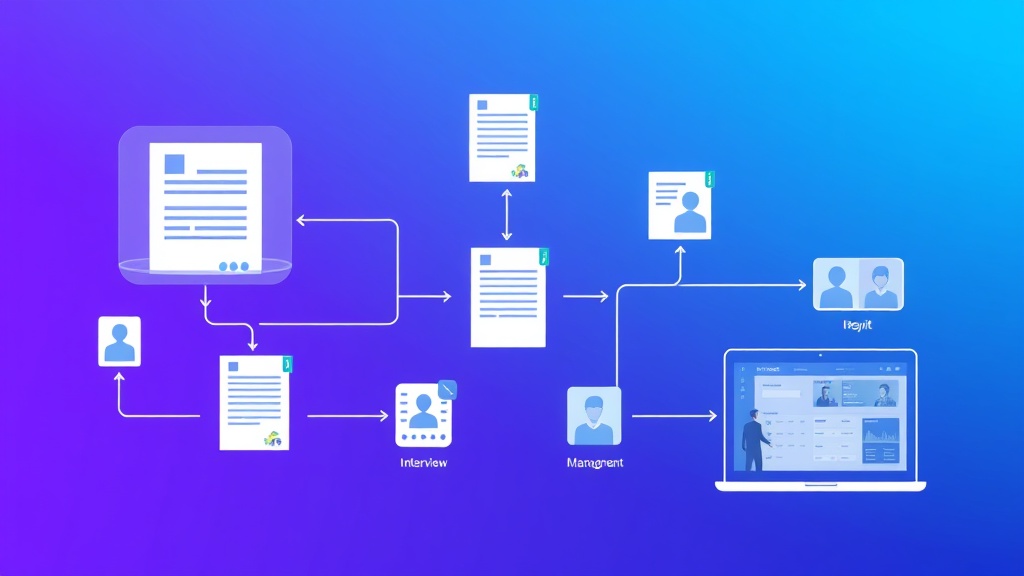
Phase 1: Resume Collection and Parsing
Step 1: Set up application intake
Configure your job board or careers page to automatically forward applications to a dedicated email address or webhook endpoint. Most ATS systems support email forwarding or API webhooks for real-time application processing.
Step 2: Create Make scenario for resume parsing
In Make, create a new scenario starting with an Email or Webhook trigger. Configure the trigger to monitor your application inbox or receive POST requests from your careers page.
Trigger: Email Watch (Gmail/Outlook)
Filter: Subject contains "New Application"
Action: Extract attachments (PDF/DOC resumes)
Step 3: Integrate Affinda for resume parsing
Add an HTTP module to send resume files to Affinda’s API. Configure the request with your API key and specify extraction fields:
POST https://api.affinda.com/v3/resumes
Headers:
  Authorization: Bearer YOUR_API_KEY
  Content-Type: application/json
Body: {
  "document": "base64_encoded_resume",
  "collection": "your_collection_id"
}
Step 4: Structure parsed data
Use Make’s data transformation tools to standardize the parsed information into a consistent format for downstream processing.
Phase 2: Automated Screening and Scoring
Step 5: Implement scoring logic
Create weighted scoring criteria based on your job requirements. Common factors include:
- Years of relevant experience (25% weight)
- Required skills match (30% weight)
- Education level (15% weight)
- Geographic location (10% weight)
- Industry experience (20% weight)
Pro Tip: Start with simple scoring rules and refine based on hiring outcomes. Track which automated decisions align with manual recruiter preferences to improve accuracy over time.
Step 6: Set qualification thresholds
Define score ranges for different actions:
- 80-100: Auto-advance to phone screening
- 60-79: Human review required
- Below 60: Polite rejection with talent pool addition
Phase 3: Communication Automation
Step 7: Configure automated responses
Set up conditional email templates in HubSpot or your preferred email platform:
High Score Template:
Subject: Next Steps - [Position] at [Company]
Body: Thank you for applying! Based on your qualifications,
we'd like to schedule a brief phone screening...
Step 8: Create rejection workflows
Design empathetic rejection emails that maintain your employer brand while providing closure to candidates.
Phase 4: Interview Scheduling Automation
Step 9: Integrate Cal.com scheduling
For qualified candidates, automatically generate personalized scheduling links through Cal.com’s API:
POST https://api.cal.com/v1/bookings
Headers:
  Authorization: Bearer YOUR_API_KEY
Body: {
  "eventTypeId": "phone_screening_event_id",
  "start": "2024-01-15T10:00:00Z",
  "attendee": {
    "email": "candidate@email.com",
    "name": "Candidate Name"
  }
}
Step 10: Set up calendar coordination
Configure Cal.com to check interviewer availability across multiple calendars and automatically book appropriate time slots based on candidate preferences.
Phase 5: Follow-up and Pipeline Management
Step 11: Implement progress tracking
Use HubSpot’s deal pipeline to track candidates through different interview stages, automatically updating status based on calendar events and email interactions.
Step 12: Configure reminder sequences
Set up automated reminders for:
- Interview confirmations (24 hours prior)
- Preparation materials and meeting links
- Follow-up scheduling for next rounds
- Decision timeline communications
Cost Breakdown and ROI Analysis
Monthly Tool Costs
- Make (Pro plan): $29/month for 10,000 operations
- Affinda: $150/month for 500 resume parses
- Cal.com (Pro): $15/user/month
- HubSpot (Starter): $45/month
- Twilio + SendGrid: $30/month for moderate usage
- Total monthly cost: $269
Time Savings Calculation
For a company processing 200 applications monthly:
- Manual screening time: 200 applications × 15 minutes = 50 hours/month
- Automated screening time: 200 applications × 2 minutes = 6.7 hours/month
- Time saved: 43.3 hours/month
- Cost savings: 43.3 hours × $50/hour = $2,165/month
- ROI: ($2,165 – $269) / $269 = 705% monthly ROI
Quality Improvements
- Reduced time-to-hire by 35% through faster initial screening
- Improved candidate experience with 24/7 responsive communication
- Decreased unconscious bias through standardized evaluation criteria
- Enhanced data tracking and recruitment analytics
Common Pitfalls and Solutions
Over-Automation Risk
Problem: Completely removing human judgment can miss exceptional candidates who don’t fit standard criteria.
Solution: Implement a “human review” category for borderline candidates and regularly audit automated decisions against successful hires.
Integration Complexity
Problem: Multiple tools can create integration headaches and data synchronization issues.
Solution: Start with 2-3 core tools and gradually expand. Use n8n as an alternative to Make for more complex, self-hosted automation scenarios.
Candidate Experience Degradation
Problem: Automated communications can feel impersonal and damage employer brand.
Solution: Invest in personalized email templates and maintain human touchpoints at critical decision stages.
Data Privacy Compliance
Problem: Automated systems may not properly handle GDPR, CCPA, or other privacy regulations.
Solution: Implement data retention policies, consent management, and regular compliance audits within your automation workflows.
Expert Insight: The most successful recruitment automation implementations maintain a 70/30 split—70% automated efficiency with 30% human judgment and relationship building. This balance maximizes efficiency while preserving the personal touch that top candidates expect.
Advanced Optimization Strategies
Machine Learning Enhancement
After collecting 6 months of data, implement machine learning models to improve scoring accuracy based on actual hiring outcomes. Tools like DataRobot or custom Python scripts can analyze which resume characteristics correlate with successful hires.
Multi-Channel Communication
Expand beyond email to include SMS notifications for urgent updates and LinkedIn outreach for passive candidates. This omnichannel approach increases response rates by 40-60%.
Predictive Analytics
Use historical data to predict optimal interview scheduling windows, identify likely offer acceptance rates, and forecast hiring pipeline conversion rates for better resource planning.
Measuring Success and Continuous Improvement
Key Performance Indicators
- Time-to-hire: Track reduction in days from application to offer
- Screening accuracy: Compare automated scores with final hiring decisions
- Candidate satisfaction: Survey automation experience ratings
- Cost-per-hire: Calculate total recruitment costs including tool subscriptions
- Pipeline conversion rates: Monitor stage-to-stage advancement percentages
Iterative Refinement
Schedule monthly reviews of automation performance, adjusting scoring criteria and communication templates based on feedback from hiring managers and candidates. Successful automation systems evolve continuously rather than remaining static.
Frequently Asked Questions
How accurate is AI resume parsing compared to human review?
Modern AI parsing tools like Affinda achieve 99%+ accuracy for standard resume formats, significantly outperforming human consistency in data extraction. However, humans excel at interpreting context and non-standard career paths. The optimal approach combines AI parsing for data extraction with human judgment for final candidate evaluation.
Can automated screening handle creative or non-traditional candidates?
Yes, but it requires careful configuration. Include alternative qualification pathways in your scoring logic, such as portfolio work, freelance experience, or bootcamp education. Consider adding a “wildcard” category for candidates who don’t fit standard criteria but show exceptional potential in specific areas.
What’s the minimum company size that justifies recruitment automation?
Companies hiring 5+ people per month typically see positive ROI from basic automation. The breakeven point is around 50 applications monthly, where time savings exceed tool costs. However, even smaller companies benefit from automation during hiring surges or seasonal recruitment periods.
How do I ensure automation doesn’t introduce hiring bias?
Regular bias audits are essential. Track hiring outcomes by demographic groups, review scoring criteria for discriminatory patterns, and implement blind resume review stages where personal identifiers are removed. Use diverse training data for any machine learning components and maintain human oversight for final decisions.
Ready to transform your recruitment process with intelligent automation? futia.io’s automation services can help you design and implement a custom recruitment automation system tailored to your specific hiring needs and company culture. Our experts handle the technical complexity while you focus on building exceptional teams.