Complete Guide to CI/CD Pipelines with AI-Assisted Testing in 2024
The software development landscape has transformed dramatically with the integration of artificial intelligence into continuous integration and continuous deployment (CI/CD) pipelines. Modern development teams are achieving 40% faster deployment cycles and 60% reduction in bug detection time by leveraging AI-assisted testing within their automated workflows. This comprehensive guide will walk you through building robust CI/CD pipelines that harness the power of AI to revolutionize your testing strategy.
Traditional testing approaches often create bottlenecks in the development process, with manual testing consuming up to 30% of development time and automated tests missing edge cases that AI can identify. By implementing AI-assisted testing in your CI/CD pipeline, you’re not just automating processes—you’re creating intelligent systems that learn from your codebase, predict potential failures, and optimize test coverage dynamically.
Prerequisites and Environment Setup
Before diving into implementation, ensure your development environment meets the following requirements. These prerequisites form the foundation for a successful AI-enhanced CI/CD pipeline that can scale with your team’s needs.
Technical Requirements
Your infrastructure should support containerization and cloud-native deployments. Docker containers are essential for consistent testing environments, while Kubernetes provides the orchestration layer needed for scalable AI model execution. Minimum server specifications include 16GB RAM and 4 CPU cores for development environments, with production environments requiring at least 32GB RAM and 8 CPU cores to handle AI model inference efficiently.
Version control systems like Git with branching strategies (GitFlow or GitHub Flow) are non-negotiable. Your repository should integrate with webhook capabilities to trigger pipeline executions automatically. Additionally, you’ll need access to cloud computing resources—AWS, Google Cloud, or Azure—with GPU instances available for training custom AI models.
Development Tools and Platforms
Select a robust CI/CD platform that supports custom integrations. Jenkins, GitHub Actions, GitLab CI/CD, or Azure DevOps all provide the flexibility needed for AI integration. For teams using automated deployment strategies, Vercel offers seamless integration with modern web applications and supports custom testing workflows through its API.
Your testing framework should be compatible with AI libraries. For JavaScript applications, Jest and Cypress work well with TensorFlow.js, while Python projects benefit from pytest integration with scikit-learn or PyTorch. Database management tools and API testing frameworks like Postman or Insomnia are also crucial for comprehensive pipeline coverage.
AI and Machine Learning Dependencies
Install Python 3.8+ with pip package management for AI model integration. Essential libraries include TensorFlow 2.x or PyTorch for model inference, scikit-learn for traditional ML algorithms, and pandas for data manipulation. For teams focusing on code quality, tools like Cursor can enhance your development workflow with AI-powered code completion and error detection.
API keys and access tokens for AI services are mandatory. OpenAI’s GPT models, Google’s Vertex AI, or AWS SageMaker require proper authentication. Budget approximately $200-500 monthly for AI service costs in production environments, depending on your testing volume and model complexity.
Architecture and Strategy Overview
A well-designed AI-assisted CI/CD pipeline integrates multiple components working in harmony. Understanding this architecture is crucial for making informed decisions about tool selection, resource allocation, and optimization strategies.
Pipeline Architecture Components
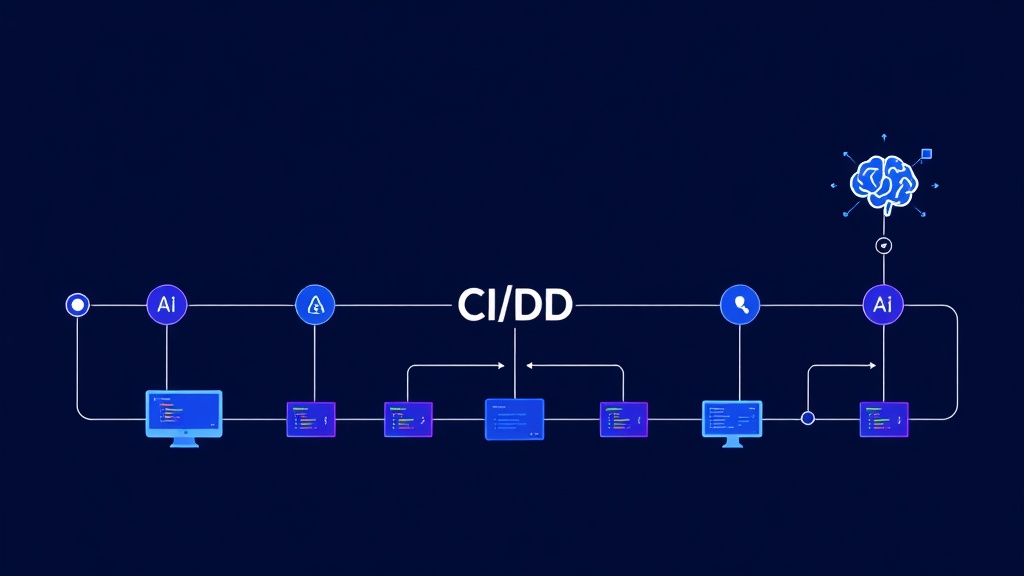
The modern AI-enhanced pipeline consists of five core stages: Source Control Integration, AI-Powered Code Analysis, Intelligent Test Generation, Automated Execution, and Deployment Validation. Each stage leverages AI capabilities differently, from static code analysis using machine learning models to dynamic test case generation based on code changes.
Source control triggers initiate the pipeline through webhooks or polling mechanisms. The AI analysis stage examines code changes, identifying potential risk areas and suggesting test scenarios. Test generation creates both traditional unit tests and AI-generated edge cases, while execution runs these tests in parallel across multiple environments.
AI Integration Strategies
Three primary strategies exist for AI integration: embedded models, external API calls, and hybrid approaches. Embedded models offer faster execution but require local GPU resources. External APIs provide access to advanced models but introduce latency and cost considerations. Hybrid approaches balance performance and cost by using local models for simple tasks and external services for complex analysis.
“The key to successful AI integration in CI/CD is starting with high-impact, low-complexity use cases. Focus on test case generation and bug prediction before attempting complex code analysis or automated fixes.” – DevOps Engineering Best Practices
Testing Strategy Framework
AI-assisted testing operates on multiple levels: unit test enhancement, integration test optimization, and end-to-end scenario generation. Unit tests benefit from AI-generated edge cases and boundary condition testing. Integration tests use AI to identify service interaction patterns and potential failure points. End-to-end tests leverage AI to simulate user behavior patterns and identify usability issues.
The testing pyramid evolves with AI integration, emphasizing intelligent test selection over comprehensive coverage. AI algorithms analyze code changes, historical bug patterns, and user behavior data to prioritize test execution, reducing overall testing time by up to 50% while maintaining quality assurance standards.
Detailed Implementation Steps
Implementation requires systematic approach, starting with basic automation and gradually introducing AI capabilities. This section provides step-by-step instructions for building your AI-enhanced pipeline from the ground up.
Step 1: Basic CI/CD Pipeline Setup
Begin by establishing a traditional CI/CD pipeline using your chosen platform. For GitHub Actions, create a .github/workflows/main.yml file in your repository root. This workflow should include basic stages: checkout, dependency installation, testing, and deployment preparation.
name: AI-Enhanced CI/CD Pipeline

on:
  push:
    branches: [main, develop]
  pull_request:
    branches: [main]

jobs:
  ai-analysis:
    runs-on: ubuntu-latest
    steps:
      - uses: actions/checkout@v3
      - name: Setup Python
        uses: actions/setup-python@v4
        with:
          python-version: '3.9'
      - name: Install AI dependencies
        run: |
          pip install tensorflow scikit-learn pandas
          pip install -r requirements.txt
      - name: Run AI code analysis
        run: python scripts/ai_code_analysis.py
Configure environment variables for API keys, database connections, and deployment targets. Use secrets management features provided by your CI/CD platform to secure sensitive information. Test the basic pipeline with simple applications before adding AI components.
Step 2: AI Model Integration
Integrate AI models for code analysis and test generation. Create a Python script that analyzes code changes and generates test recommendations. This script should examine git diff outputs, identify changed functions, and suggest appropriate test cases based on code complexity and historical bug data.
import tensorflow as tf
import pandas as pd
from sklearn.feature_extraction.text import TfidfVectorizer

class AITestGenerator:
    def __init__(self, model_path):
        self.model = tf.keras.models.load_model(model_path)
        self.vectorizer = TfidfVectorizer(max_features=1000)

    def analyze_code_changes(self, diff_content):
        # Extract features from code changes
        features = self.vectorizer.fit_transform([diff_content])

        # Predict test complexity and priority
        complexity_score = self.model.predict(features.toarray())[0]

        return {
            'complexity': float(complexity_score),
            'recommended_tests': self.generate_test_cases(diff_content),
            'priority': 'high' if complexity_score > 0.7 else 'medium'
        }
Train your AI models using historical code changes and corresponding bug reports. Collect data from your version control system, bug tracking tools, and test results to create training datasets. Models should learn patterns between code changes and potential failure points.
Step 3: Intelligent Test Execution
Implement smart test selection algorithms that prioritize test execution based on AI predictions. Instead of running all tests for every change, use AI to identify which tests are most likely to catch issues related to specific code modifications.
Create a test orchestrator that communicates with your AI models to determine test execution strategy. This component should analyze code changes, consult the AI model for risk assessment, and generate an optimized test execution plan.
class SmartTestOrchestrator:
    def __init__(self, ai_analyzer):
        self.ai_analyzer = ai_analyzer
        self.test_history = self.load_test_history()

    def create_execution_plan(self, changed_files):
        risk_scores = {}

        for file_path in changed_files:
            with open(file_path, 'r') as f:
                content = f.read()

            analysis = self.ai_analyzer.analyze_code_changes(content)
            risk_scores[file_path] = analysis['complexity']

        # Sort tests by risk score and historical failure rates
        prioritized_tests = self.prioritize_tests(risk_scores)

        return {
            'high_priority_tests': prioritized_tests[:10],
            'medium_priority_tests': prioritized_tests[10:30],
            'low_priority_tests': prioritized_tests[30:]
        }
Step 4: Automated Test Generation
Implement AI-powered test case generation that creates new tests based on code analysis. Use large language models or custom-trained models to generate unit tests, integration tests, and edge case scenarios automatically.
For teams using comprehensive analytics platforms, PostHog can provide valuable user behavior data that informs AI test generation, ensuring tests reflect real-world usage patterns and edge cases.
AI Testing Tools Comparison
Selecting the right AI testing tools significantly impacts your pipeline’s effectiveness. Here’s a comprehensive comparison of leading AI-assisted testing platforms:
| Tool | AI Capabilities | Pricing (Monthly) | Integration Complexity | Best Use Case |
|---|---|---|---|---|
| Testim | Self-healing tests, Smart locators | $450/month | Medium | UI test automation |
| Mabl | Auto-test generation, Visual testing | $300/month | Low | End-to-end testing |
| Functionize | NLP test creation, ML-powered maintenance | $500/month | High | Enterprise applications |
| Applitools | Visual AI, Cross-browser testing | $199/month | Medium | Visual regression testing |
| Test.ai | Autonomous mobile testing | $2000/month | Low | Mobile app testing |
Advanced Configuration and Optimization
Once your basic AI-assisted pipeline is operational, focus on optimization and advanced configurations. These enhancements can improve performance, reduce costs, and increase reliability.
Performance Optimization
Optimize AI model inference by implementing caching mechanisms for frequently analyzed code patterns. Use Redis or Memcached to store analysis results and avoid redundant model calls. Implement parallel processing for test execution, leveraging container orchestration platforms like Kubernetes to scale testing infrastructure dynamically.
Monitor pipeline performance using metrics dashboards. Track key indicators like test execution time, AI model response times, false positive rates, and deployment frequency. Set up alerts for performance degradation and implement automatic scaling policies based on workload demands.
Cost Management Strategies
AI services can become expensive without proper cost management. Implement request throttling for external AI APIs, use local models for simple analysis tasks, and cache results to minimize API calls. Monitor usage patterns and optimize model selection based on cost-effectiveness ratios.
Consider using spot instances for non-critical testing workloads, implementing auto-scaling policies that shut down resources during low-activity periods, and negotiating volume discounts with AI service providers for high-usage scenarios.
Troubleshooting Common Issues
AI-assisted CI/CD pipelines introduce unique challenges that require specific troubleshooting approaches. Understanding common issues and their solutions prevents extended downtime and maintains development velocity.
Model Performance Issues
When AI models produce inconsistent results or high false positive rates, investigate training data quality first. Insufficient or biased training data leads to poor model performance. Retrain models with diverse datasets that represent your current codebase and development patterns.
Monitor model drift by tracking prediction accuracy over time. Implement automated model retraining pipelines that trigger when performance metrics fall below acceptable thresholds. Use A/B testing to compare model versions and gradually roll out improvements.
Integration Failures
API timeouts and service unavailability can disrupt AI-assisted workflows. Implement circuit breaker patterns that fall back to traditional testing methods when AI services are unavailable. Configure retry mechanisms with exponential backoff to handle temporary service interruptions gracefully.
Version compatibility issues between AI libraries and CI/CD platforms require careful dependency management. Use containerized environments to ensure consistent library versions across development, testing, and production environments.
Resource Constraints
GPU memory limitations and CPU bottlenecks can slow down AI model inference. Implement model quantization techniques to reduce memory requirements, use batch processing for multiple code analysis requests, and consider distributed computing approaches for large-scale testing scenarios.
“The most common mistake in AI-assisted CI/CD implementation is trying to replace human judgment entirely. AI should augment human decision-making, not replace it. Always maintain human oversight for critical deployment decisions.”
Security and Compliance Considerations
AI integration introduces additional security vectors that require careful consideration. Code analysis AI models have access to your entire codebase, making security paramount for protecting intellectual property and sensitive business logic.
Data Privacy and Protection
Implement data encryption for all AI model communications, both in transit and at rest. Use secure API endpoints with proper authentication and authorization mechanisms. For organizations with strict compliance requirements, consider on-premises AI model deployment to maintain complete data control.
Audit AI model access patterns and maintain logs of all code analysis activities. Implement role-based access controls that limit AI system permissions to necessary resources only. Regular security assessments should include AI components and their data handling practices.
Compliance and Governance
Establish clear governance policies for AI model usage, including approval processes for new models, performance monitoring requirements, and bias detection protocols. Document AI decision-making processes for compliance audits and maintain transparency in automated testing decisions.
For teams managing customer communications and compliance workflows, integrating tools like Mailchimp can help maintain stakeholder communication about deployment status and system changes while ensuring compliance with notification requirements.
Next Steps and Advanced Implementation
After successfully implementing basic AI-assisted CI/CD pipelines, consider these advanced enhancements to maximize your investment and competitive advantage.
Machine Learning Operations (MLOps)
Implement MLOps practices to manage AI models as first-class citizens in your development workflow. This includes version control for models, automated model testing, performance monitoring, and gradual rollout strategies for model updates.
Establish model registries that track model versions, performance metrics, and deployment history. Implement automated model validation pipelines that test new models against historical data before deployment to production environments.
Advanced AI Capabilities
Explore advanced AI capabilities like natural language processing for test case generation from requirements documents, computer vision for UI testing automation, and reinforcement learning for optimization of test execution strategies.
Consider implementing AI-powered code review systems that provide intelligent feedback on code quality, security vulnerabilities, and performance optimization opportunities. These systems can significantly reduce manual code review time while maintaining quality standards.
Frequently Asked Questions
How much does it cost to implement AI-assisted testing in CI/CD pipelines?
Implementation costs vary significantly based on team size, testing complexity, and chosen tools. Small teams (5-10 developers) can expect monthly costs of $500-1500 for AI services and tooling, while enterprise implementations may require $5000-15000 monthly. Initial setup costs include infrastructure provisioning ($2000-5000) and training/consulting services ($10000-25000). ROI typically becomes positive within 6-12 months through reduced manual testing time and faster deployment cycles.
What’s the learning curve for teams adopting AI-assisted CI/CD?
Most development teams require 2-4 weeks to become proficient with basic AI-assisted testing tools, assuming existing CI/CD experience. Advanced implementations requiring custom model development need 2-3 months for full proficiency. Key success factors include starting with simple use cases, providing adequate training resources, and maintaining traditional testing methods as fallbacks during the transition period.
How do AI-assisted pipelines handle edge cases and unexpected scenarios?
AI models excel at identifying edge cases that human testers might miss by analyzing code patterns and historical failure data. However, they require continuous training with new data to maintain effectiveness. Implement hybrid approaches that combine AI predictions with human expertise for critical decisions. Regular model retraining with production data ensures edge case detection capabilities improve over time.
Can AI-assisted testing replace manual QA processes entirely?
While AI significantly reduces manual testing requirements, complete replacement isn’t recommended for most organizations. AI excels at repetitive tasks, pattern recognition, and regression testing but struggles with subjective quality assessments, user experience evaluation, and complex business logic validation. The optimal approach combines AI automation for routine testing with human expertise for strategic quality decisions and creative test scenario development.
Ready to transform your development workflow with AI-assisted CI/CD pipelines? The implementation process requires careful planning, the right tools, and expert guidance to maximize ROI and minimize risks. futia.io’s automation services can help you design, implement, and optimize AI-enhanced pipelines tailored to your specific requirements, ensuring successful adoption and measurable business outcomes.